


GET 30-MINUTE FREE CONSULTATION

Better than Time Doctor

Vineforce Teams does more than just track hours and monitor activity. It helps teams understand what work is being done, how tasks are progressing, and where attention is needed. Instead of relying on screenshots and constant monitoring, Vineforce Teams focuses on clarity, productivity, and results so managers can guide teams better and employees can work without feeling watched.

Enjoy a 07-day free trial with no credit card required.

By creating an account, you accept our Terms and Privacy Policy.

Better than Time Doctor - Vineforce Teams

Quick Summary: Vineforce Teams is the ideal alternative to TimeDoctor for organizations seeking a productivity-focused tracker without intrusive employee surveillance. Rather than constant screenshot monitoring and activity rating, Vineforce Teams combines easy time tracking with built-in task and project management, and AI-powered performance insights to empower employees.

GetApp
Software Advice
Microsoft Azure Marketplace
Product Hunt
G2
Capterra
GoodFirms
GetApp
Software Advice
Microsoft Azure Marketplace
Product Hunt
G2
Capterra
GoodFirms

The All-in-One Advantage

Why settle for a tool that only watches you work when you can have one that helps you get it done?
Productivity Meets Execution

Productivity Meets Execution

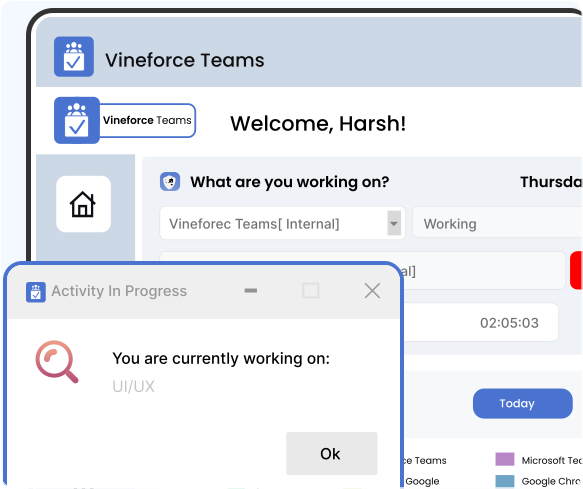
Work doesn't progress just because a timer is running. Vineforce Teams is designed to help teams stay aligned and focused throughout the day. It combines smart time tracking with full task and project management, giving you a clear view of daily output. Instead of switching between multiple tracking and project apps, your team can manage priorities and meet deadlines in one simple workspace.
The Traditional Way

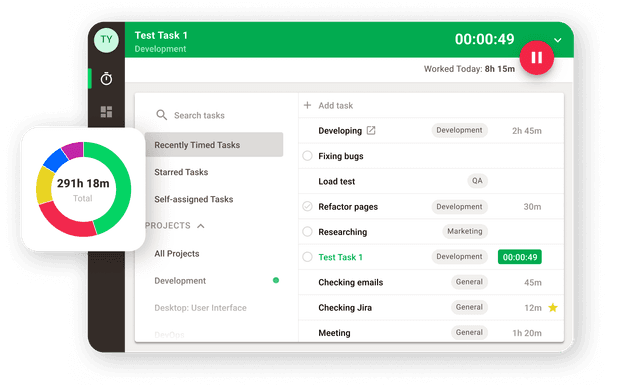
Most traditional tracking tools focus mainly on monitoring activity, often missing how real work actually gets done.

Movement Without Momentum

Movement Without Momentum

Time Doctor focuses heavily on activity metrics, desktop screenshots, and keyboard/mouse clicks. While this logs computer presence, it fails to show actual project progress. Because it lacks task planning and board systems, managers receive time reports but remain in the dark about task completions, deadlines, and project statuses.

What is the Main Difference

Most tools just watch your team. Vineforce helps them win. See how we compare to the traditional tracking way.

Vineforce Teams

Vineforce Teams is built for teams that want full visibility into work not just activity data.

  • Delivers intelligent workforce insights, not just basic time tracking.
  • Uses automatic, real-time activity analysis with higher accuracy.
  • Improves productivity through AI-driven insights without interrupting employees.
  • Offers fully customizable dashboards and reports based on team needs.
  • Combines productivity, performance, and efficiency into one unified platform.
  • Built for scaling teams and enterprises that need advanced control.
Time Doctor

Time Doctor primarily relies on time tracking and reminders to maintain employee accountability.

  • Focuses mainly on time tracking and accountability.
  • Relies on manual or automatic timers to record time.
  • Uses distraction alerts and pop-ups to keep employees on task.
  • Provides limited customization in reports and settings.
  • Offers screenshots, app tracking, and payroll as separate basic features.
  • Best suited for activity insights rather than full productivity management.
  • Better suited for small teams needing basic activity logging.

What Makes Vineforce Teams Better

While many tools focus only on monitoring activity, Vineforce Teams is built to help teams manage work improve productivity and stay organized every day not just analyze behavior.

Smart Time Tracking

Smart Time Tracking

Vineforce Teams tracks working time accurately with zero click tracking and offline support. It captures real effort without interrupting employees and helps teams understand where time is actually spent.

App and Website Activity Insights

App and Website Activity Insights

See which apps and websites are used during work hours to understand focus patterns. These insights help teams reduce wasted time and improve daily work habits.

Attendance and Shift Tracking

Attendance and Shift Tracking

Manage work hours shifts and attendance effortlessly. Vineforce Teams helps teams stay aligned with schedules while simplifying reporting and planning.

Frequently Asked Questions

Time Doctor focuses heavily on user monitoring, capturing screenshots, keystroke frequency, and app logs to calculate active time percentages. Vineforce Teams is a productivity workspace. It merges automatic time tracking directly with interactive task planning, Kanban boards, and system performance metrics, focusing on actual project results rather than surveillance.

Instead of measuring productivity by raw computer activity, Vineforce Teams links logged hours directly to task lists and milestones. This helps managers identify bottlenecks and enables employees to organize their work days autonomously, focusing on structured output.

Vineforce Teams supports customizable screenshot captures to verify output, but it is built to foster trust and accountability. It avoids intrusive surveillance like secret keylogging, and all tracked metrics are transparently visible to the employees themselves.

Yes. With integrated project timelines and task assignment boards, managers can track project speed and completion rates in real time, eliminating the need to parse raw activity graphs to guess project status.

Absolutely. Vineforce Teams is designed specifically for remote and hybrid teams. It helps managers keep tabs on team velocity and system health while providing employees the flexibility to log work hours and organize their days transparently.

Ready to streamline your entire workflow?

Vineforce Teams makes it simple to monitor employee productivity with automated time tracking, smart idle detection, and detailed reporting. Build the perfect system to manage projects, ensure accountability, and get insights into your team’s workflow, all in one place.
