






GET 30-MINUTE FREE CONSULTATION

Better than Hubstaff

Hubstaff tracks time. Vineforce Teams tracks progress. It combines time tracking, task and project management, and performance analytics in one place so you get real productivity insights, not just hours and activity data. Vineforce Teams helps teams work smarter without intrusive monitoring.

Enjoy a 07-day free trial with no credit card required.

By creating an account, you accept our Terms and Privacy Policy.

Better than Hubstaff - Vineforce Teams

Quick Summary: Vineforce Teams is the premier alternative to Hubstaff for teams looking to optimize workflows instead of just clocking hours. While Hubstaff centers on strict time tracking and activity monitoring, Vineforce Teams goes further by integrating time tracking with project visibility, task management, and AI-powered performance summaries.

GetApp
Software Advice
Microsoft Azure Marketplace
Product Hunt
G2
Capterra
GoodFirms
GetApp
Software Advice
Microsoft Azure Marketplace
Product Hunt
G2
Capterra
GoodFirms

The All-in-One Advantage

Why rely on a tool that only counts hours when you can use one that drives real results?
Built to Support Work, Not Just Track It

Built to Support Work, Not Just Track It

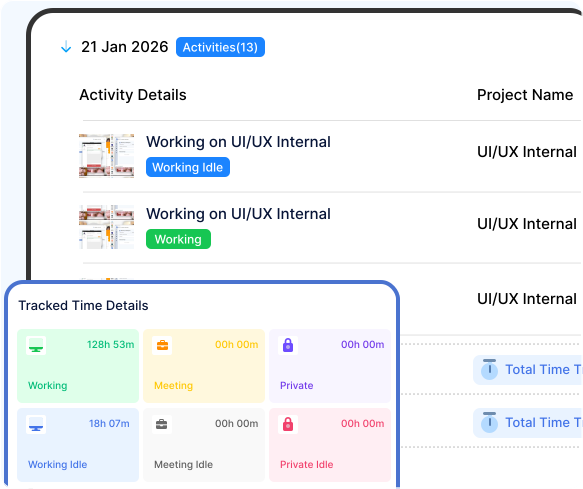
Work doesn't move forward just because a timer is running. Vineforce Teams is designed to help teams stay focused, aligned, and productive throughout the day. Unlike Hubstaff, which centers mainly on timesheets and surveillance, Vineforce Teams brings time tracking, tasks, projects, and AI performance reports together in one seamless system. Your team can plan work and hit deadlines without switching between multiple apps, while leaders get clear, meaningful visibility.

The Traditional Way

Many tracking platforms still rely on measuring presence rather than progress. They capture time and activity, but often fail to explain how that time contributes to real outcomes.

Tracking Hours Without Understanding Results

Tracking Hours Without Understanding Results

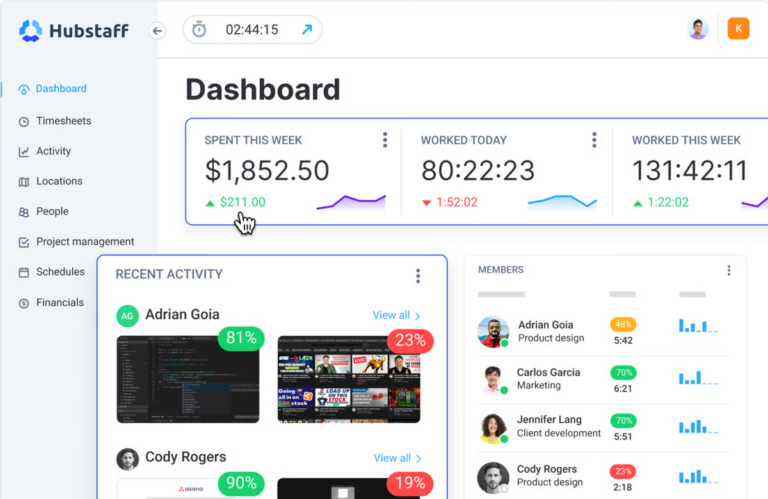
Hubstaff is built primarily around monitoring time, activity levels, and screen capturing. While this shows how long someone sat at their computer, it offers very little visibility into what was actually achieved. Without direct task and project boards, managers are forced to guess project status based on raw hours. This surveillance-first approach often creates friction instead of supporting employees in delivering actual work.

What's the Main Difference?

See how Vineforce Teams stacks up against generic tracking alternatives.

Vineforce Teams

Vineforce Teams is a comprehensive workforce productivity platform built to deliver deep visibility, control, and actionable insights.

  • Advanced time tracking with real-time activity monitoring.
  • Detailed app & website usage tracking with productivity insights.
  • Automated screenshots, system activity logs, and monitoring controls.
  • Customizable dashboards and detailed productivity reports.
  • Cloud and self-hosted deployment options for full data ownership
  • Designed to improve productivity-not just track hours
Hubstaff

Hubstaff focuses mainly on logging work hours and basic activity data. While useful for timesheets and payroll, it offers limited insight into real productivity.

  • Core focus on time tracking and employee monitoring.
  • Tracks app usage, websites visited, and basic activity levels.
  • Screenshot capture and standard productivity metrics
  • Limited customization and reporting flexibility
  • Strong emphasis on timesheets, payroll, and attendance tracking

What Makes Vineforce Teams Better

Vineforce Teams shows real work patterns, user attentiveness, and application usage so you can make smarter decisions based on actual productivity.

Automatic Screenshots

Automatic Screenshots

Vineforce Teams takes secure, automated screenshots at defined intervals, giving managers clear visibility into ongoing work without manual supervision.

User Attentiveness Tracking

User Attentiveness Tracking

Vineforce Teams analyzes user activity patterns to determine attentiveness levels, helping identify idle time, disengagement, and true productivity

Application & URL

Application & URL

Vineforce Teams helps managers proactively identify distractions and policy violations, ensuring teams stay focused on productive work.

Frequently Asked Questions

While Hubstaff is designed primarily for logging hours, managing timesheets, and running payroll, Vineforce Teams is a complete work management platform. It integrates automatic time tracking directly with interactive task planning, project timelines, and AI-enabled performance insights.

Vineforce Teams tracks actual work progress and outcomes rather than raw activity levels. Instead of focusing heavily on keystroke frequency or mouse movements to estimate productivity, Vineforce helps you monitor task completion rates and project milestones.

Transparency is key. Explain to your team that Vineforce is being implemented to balance workloads, track project timelines, and identify daily obstacles. Emphasize that it is designed to help them manage their work day autonomously, not to scrutinize their every action.

Vineforce Teams is ideal for organizations that want to foster a culture of trust and focus on work results rather than monitoring screen activity. It is perfect for teams that need built-in project planning and task lists alongside time tracking.

Ready to Move Beyond Basic Time Tracking?

Start using Vineforce Teams to gain clear visibility into work, keep your team aligned, and focus on real results.