




GET 30-MINUTE FREE CONSULTATION

Better than Insightful

Vineforce Teams is a productivity-first alternative to Insightful Tracker. It brings time tracking, tasks, projects, and team performance together in one place, offering clear insights into how work gets done every day without relying only on screenshots or passive monitoring.

Enjoy a 07-day free trial with no credit card required.

By creating an account, you accept our Terms and Privacy Policy.

Better than Insightful - Vineforce Teams

Quick Summary: Vineforce Teams is a powerful alternative to Insightful for companies wanting a complete work management platform rather than standalone workforce analytics. While Insightful excels at employee monitoring and operational analytics, Vineforce Teams integrates time tracking with project visibility, task workflows, and automated performance reviews.

GetApp
Software Advice
Microsoft Azure Marketplace
Product Hunt
G2
Capterra
GoodFirms
GetApp
Software Advice
Microsoft Azure Marketplace
Product Hunt
G2
Capterra
GoodFirms

The All-in-One Advantage

Why settle for a tool that only watches you work when you can have one that helps you get it done?
Productivity First, Monitoring Second

Productivity First, Monitoring Second

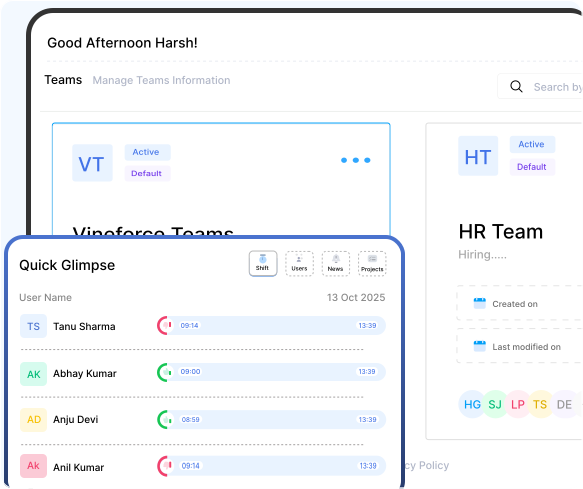
Let's be honest—activity charts alone don't deliver results. That's why Vineforce Teams takes a different approach. It combines intelligent time tracking with built-in task and project management in one unified workspace. You don't just see hours logged; you see real progress, manage priorities, and guide your team toward actual outcomes—all from a single, intuitive platform.
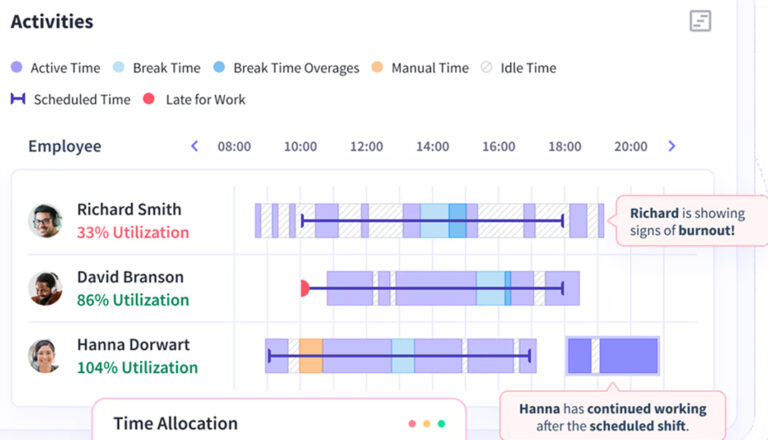

The Traditional Way

Traditional employee monitoring tools track raw activity, but they often fall short of showing real progress.

Measures Hours, Not Outcomes

Measures Hours, Not Outcomes

Insightful focuses heavily on employee monitoring, tracking active work hours, idle time, and application usage. While these activity metrics are useful for analyzing behavior trends, they don't actually help execute the work. Because it lacks built-in task planning or project management features, teams must rely on additional software to align on deadlines and manage daily workloads.

What is the Main Difference

Most tools just watch your team. Vineforce helps them win. See how we compare to the traditional tracking way.

Vineforce Teams

Vineforce Teams is built for teams that want full visibility into work not just activity data.

  • Fully automated tracking with smart idle detection (no manual start/stop needed) time tracked even offline and synced later
  • Tracks apps and websites used and gives detailed workflow insights.
  • Real-time activity dashboards with actionable analytics.
  • Continues tracking without internet; syncs later.
  • Assign time to projects/tasks with budget tracking.
  • AI analyzes data and generates deep productivity insights
  • Tracks hardware performance and IT assets for remote teams.
Insightful

Insightful is an employee monitoring tool focused on productivity tracking.

  • Auto captures active work time vs idle time for activity trends.
  • Labels apps/websites as productive/neutral/unproductive.
  • Not core (focuses more on trends than visual proof).
  • Offers monitoring charts and reports, but trend-focused rather than continuous live tracking.
  • Needs connection for full activity tracking.
  • Tracks project time, but fewer advanced project-budget analytics.
  • Not emphasized; focus is productivity trend analysis.

What Makes Vineforce Teams Better

While many tools focus only on monitoring activity, Vineforce Teams is built to help teams manage work improve productivity and stay organized every day not just analyze behavior.

System Management

System Management

Vineforce Teams’ System Management feature provides clear visibility into employee devices and system performance, helping identify the real reasons behind productivity issues.

App and Website

App and Website

See which apps and websites are used during work hours to understand focus patterns. These insights help teams reduce wasted time and improve daily work habits.

Shift Tracking

Shift Tracking

Manage work hours shifts and attendance effortlessly. Vineforce Teams helps teams stay aligned with schedules while simplifying reporting and planning.

Frequently Asked Questions

Vineforce Teams is better suited for complete workforce management because it goes beyond activity logs to integrate time tracking with task management, project planning, and remote device monitoring. Insightful focuses primarily on employee monitoring and activity analytics.

Yes, Vineforce Teams can reduce your software footprint. It replaces the need for separate time trackers, project management boards, attendance loggers, and hardware inventory trackers by combining them into one unified dashboard.

Insightful does not have full project or task management systems. It tracks the time spent on apps and websites, but you will still need external tools to assign tasks, set project milestones, and manage deadlines.

Vineforce Teams gives managers clear visibility into active hours, task progress, and app usage without micromanagement. By connecting tracked time to specific task outcomes and utilizing AI-generated daily summaries, it helps teams identify work bottlenecks and stay focused on real output.

Absolutely. Vineforce Teams is built specifically for remote and hybrid work. It helps managers keep tabs on team velocity and system health while providing employees the flexibility to log work hours and organize their days transparently.

Ready to streamline your entire workflow?

Vineforce Teams makes it simple to monitor employee productivity with automated time tracking, smart idle detection, and detailed reporting. Build the perfect system to manage projects, ensure accountability, and get insights into your team’s workflow, all in one place.